Submit a track and discover how Requests and Matches work in Galaxy: mutual exchanges, 30-day placements and how track position is decided by playlist level.
Every 7 days (from Friday to the following Friday) you can submit a track of your choice by clicking the CHOOSE SONG button.
How to submit
- Select the track: Confirm the track you want to propose.
- Choose the planet: Select the highlighted planet matching your approved playlist.
- Subgenres: Add any subgenres in the next window to fine-tune your target.
Automatic distribution
- The track is sent to all users with the same selected music genres who completed the process within the same 7-day window.
Requests are only received after you have submitted a track in Galaxy within the 7-day window. They represent the exchange proposals sent by other users.
How they work
- Review: You can check each artist's data and their playlist before deciding whether to approve (Heart icon) or reject (X icon) the request.
- Match (positive outcome): If both users press the Heart, a Match is created. The tracks are placed in the respective playlists for 30 days, in the position assigned based on the playlist's Level.
- Reject (X): If either user presses the X, the Request disappears. The other user receives no notification and there is no penalty to the account.
- Interface: On the right side of each Request you can preview the conditions that would apply in case of a Match.
A Match is a mutual exchange of tracks between two playlists, triggered when both users approve each other's Requests.
How it works:
- Automatic management: Tracks are added to the playlists automatically when the Match is activated and removed when the period ends.
- Duration: Each Match lasts 30 days.
- MATCHES tab: Information about active/completed matches, track positioning, and remaining duration.
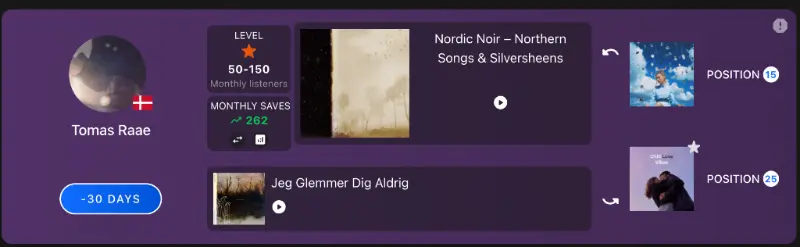
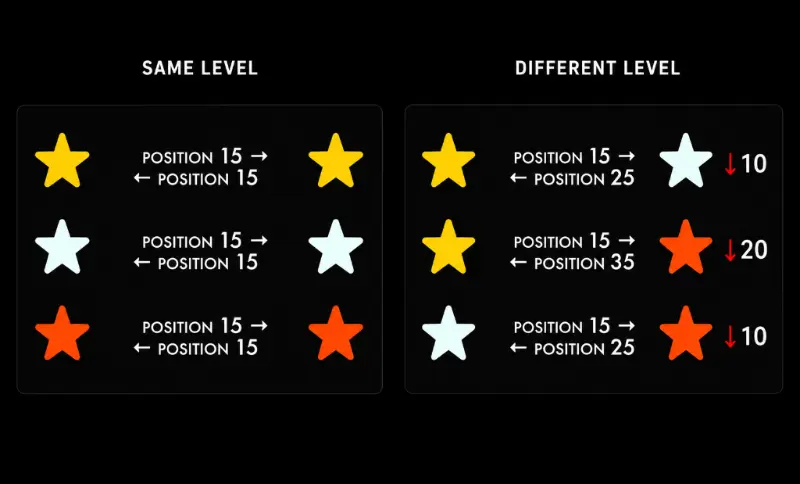
When a match occurs, the tracks are automatically added to each other's playlists at an initial position (15, 25 or 35).
To ensure a fair exchange and balanced streams, the position is calculated based on the playlist's Level:
- Same Level: Both tracks enter directly at position 15.
- Different Levels: For each level of difference between the two playlists, the starting position drops by 10 spots (e.g. position 25 or 35).